Sessions
Sessions are an important concept if you ever want to secure part of your site or want to pass data from one page to another without the use of forms or cookies. When someone visits an ASP page, the web server creates a "session" for that user and can tell the difference between users. By the use of these sessions, variables and information can be tied to that user. The important concept to realise with sessions is they are stored on the server in memory, not on the hard drive as files (in the case of cookies). However, in order to tie the session with a user, a unique session ID stored on your computer as a cookie. The diagram below shows the kind of cookie that might be set when you first visit a ASP-based site.
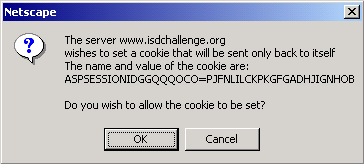 |
| Diagram 3 - ASP site setting the session cookie |
It must be noted that you must have cookies enabled and turned on in order for a client to use sessions. If cookies are disabled, the server cannot establish the session cookie and it has no ID to link session variables to.
Below is a simple bit of code that sets a session variable and writes it to the browser.
<%
' Just a bit of session variable setting
session("thingy") = "Hi. I'm a session variable. How are you?"
response.write session("thingy")
%>
On it's own, this isn't much good. However, you can use sessions to personalise some things on a site. Consider the form below:
<HTML>
<HEAD>
<TITLE>Session Set</TITLE>
</HEAD>
<BODY>
<H1>Session Set</H1>
This form below will take the name you input and set it as a session variable
which will be printed on the following page after you submit it.
<FORM ACTION="sessionset2.asp" METHOD="Post">
<INPUT NAME="name" TYPE="text">
<INPUT NAME="Submit" TYPE="submit" VALUE="Hit me!">
</FORM>
</BODY>
</HTML>
Below is the ASP code that the form posts to:
<%
' Here we will take our request.form variable and slap it into a session variable
' so we can manipulate it
session("yourname") = request.form("name")
response.write session("yourname")
response.write "<P><A HREF='sessionset3.asp'>Go to page 3</A>"
%>
To prove that session variables are carried across multiple pages, there is a link to a file called seessionset3.asp The code for sessionset3.asp is below:
<%
response.write "Your name is still " & session("yourname")
%>
sessionset2.asp and sessionset3.asp will both display the name as what you entered in the form. Thus, you can create a personalised experience for the user. One practical use of sessions is restricting access to certain pages. Below is some code that you might include on a page to secure it.
<%
' our securing code
IF session("access") = 1 THEN
Response.redirect "authorised.asp"
ELSE
Response.redirect "notauthorised.asp"
END IF
%>
To set the session("access"), you could use a form that compares the inputed values against a group of "authorised" values, then set the session variable. Since sessions are unique, you would have then created a situation where only someone with the right session variable could access the page.